> ## Documentation Index
> Fetch the complete documentation index at: https://knowledgebase.newyorkcityservers.com/llms.txt
> Use this file to discover all available pages before exploring further.
# Power Controls
> View and manage power for your VPS remotely
The VPS control panel offers the ability to see the live power status of your VPS, as well as perform remote power functions.
## Where To Find Power Controls
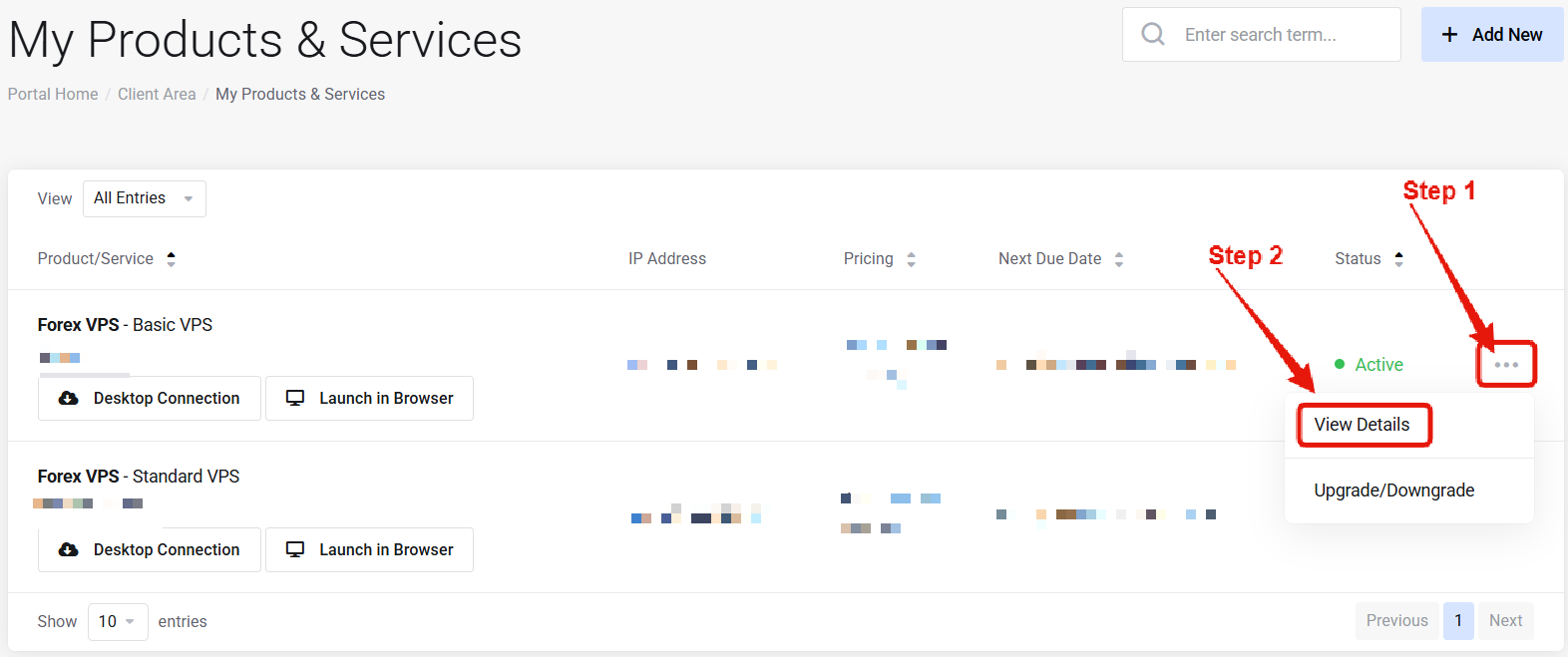 Visit the ["My Products & Services" page](https://newyorkcityservers.com/billing/clientarea.php), and find the specific service that you wish to manage. Click on the three dots to the right side, and then click "View Details".
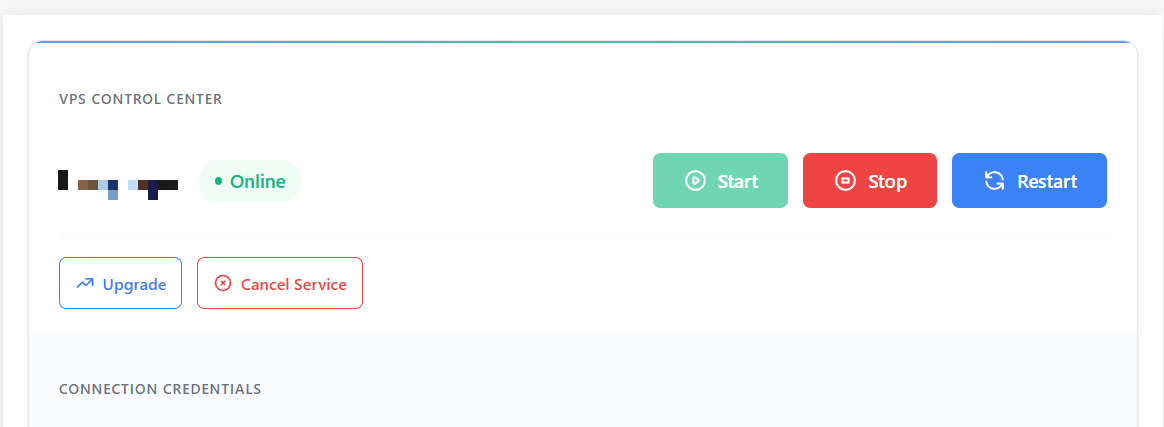 Scroll down the page until you locate the "VPS Control Panel" section. To the right of your VPS name you will find the live power status and power control buttons.
***
## How to Reboot Your VPS
After locating the power controls for your service using the guide above, simply click the reboot button to initialize a reboot.
After initializing a reboot, wait 5-10 minutes for the reboot to complete. It is normal that the VPS is not accessible during this time.
After the reboot has completed you will be able to connect to the VPS again.
For shutdown or start, follow similar steps using the appropriate button. Avoid issuing multiple power control commands in rapid succession — wait for each action to complete before issuing another.
***
## Common Questions
Reboots typically take 5-10 minutes to complete. You may also use the [web browser access](/connect/web-browser) feature to watch the VPS screen live and see the reboot process in real time.
Please [contact support](mailto:support@newyorkcityservers.com) so that we can investigate. You can also use the [web browser access](/connect/web-browser) feature to check the VPS screen in real time.
Scroll down the page until you locate the "VPS Control Panel" section. To the right of your VPS name you will find the live power status and power control buttons.
***
## How to Reboot Your VPS
After locating the power controls for your service using the guide above, simply click the reboot button to initialize a reboot.
After initializing a reboot, wait 5-10 minutes for the reboot to complete. It is normal that the VPS is not accessible during this time.
After the reboot has completed you will be able to connect to the VPS again.
For shutdown or start, follow similar steps using the appropriate button. Avoid issuing multiple power control commands in rapid succession — wait for each action to complete before issuing another.
***
## Common Questions
Reboots typically take 5-10 minutes to complete. You may also use the [web browser access](/connect/web-browser) feature to watch the VPS screen live and see the reboot process in real time.
Please [contact support](mailto:support@newyorkcityservers.com) so that we can investigate. You can also use the [web browser access](/connect/web-browser) feature to check the VPS screen in real time.